 |
|
 |
| |
 |
|
Character Window |
|
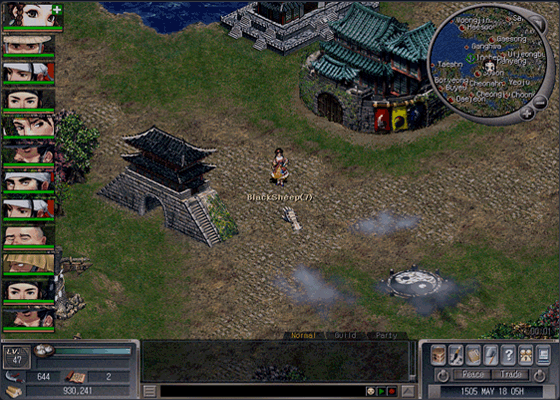
It shows your main character and your all mercenaries.
Left click on their icon to check their inventory and right click to check their status. |
|
| |
|
|
Overall Information |
|
| Level |
 Displays current level of your main character Displays current level of your main character |
| Stamina |
 Displays current level of your hunger Displays current level of your hunger |
| Attack |
 Displays total power of you and your mercenaries Displays total power of you and your mercenaries |
| Credit Level |
 Displays current credit level Displays current credit level |
| Money |
 Displays total money in possession Displays total money in possession |
|
|
| |
|
|
Chat Window |
|
 |
| Chat Window |
 Write messages here. Write messages here. |
| Emoticons |
 Show how you feel Show how you feel |
| Play repeater |
 Repeat up to five sentences Repeat up to five sentences |
| Set up repeater |
 Write up to five sentences that you want repeated Write up to five sentences that you want repeated |
| Chatting window +/- |
 Control the size of the chat window Control the size of the chat window |
|
|
|
| |
|
|
Menu bar |
|
| Inventory |
 |
|
See items and weapons that the selected character
has in possession. |
|
| Status |
 See your character and mercenaries status See your character and mercenaries status |
| Property |
 See your money, real estate, and investment status See your money, real estate, and investment status |
| Charater window |
 Open and close your character window Open and close your character window |
| Quest |
 Check your quest information and status Check your quest information and status |
| Community |
 Add or delete friends and also send messages Add or delete friends and also send messages |
| System Menu |
 Opens system menu Opens system menu |
| Battle / Peace Mode |
 Change your main character's status on the field Change your main character's status on the field |
| Trade on / off |
 Toggle trades on and off Toggle trades on and off |
| Date |
 |
|
Check game year, month,
day and time on here. |
|
|
|
| |
|
|
Mini Map |
|
| Mini Map |
 |
|
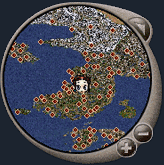
Displays current location.
Zoom in and out with +/- keys. |
|
|
|
| |
|
|
NPC/GM |
|
| NPC |
 |
|
Non player character that helps you to understand
game and gives you variety quests. |
|
| GM |
 Operators Operators |
|
|